Showing posts with label Facebook tricks. Show all posts

Wednesday, 16 March 2016

How to Verify Locked Facebook Account Through Identity 2016 (Guide)

How to Verify Locked Facebook Account Through Identity 2016 (Guide) 


How to Verify Locked Facebook Account Through Identity 2016 (Guide)
How to Verify Locked Facebook Account Through Identity 2016 (Guide) 

Dear Brothers

Requirements for Verified ID.

1. Scanned Proof in form of Smart Identity Card/Driving License/Passport/College Card/Employee Card

2. Gmail ID

First of all ap ko jis name ki id chahye us name se id bna len 
but date of birth n gender as per proof den. Then ap ny settings m 
ja kr Name as per proof rkh lna hai.

after this koi bhi profile pic upload kr den .. 
ub hmen is iD ko remove krna h fb se us k liye ap 
http://865765530309 http://865765530309 is link se profile pic m comment kr den apki id fb 1 sec m remove ho jaye gi . then
ap login kren to fb ap se security check mangy ga  IHV5RT << like this 
after this woh ap se Date of Birth mangy ga .. ap ny 3 bar DOB ko ghlt likhna hai 

is link pr chly jana hai aur proof upload krna hai .
proof upload krny k 10 minute bad fb se email ay gi us k reply 
m bh ap ny wohi proof upload kr dna hai yeh likh kr >> this is my real identity card and it is my real gov issued card please verify my account. 

thanks

8 se 10 hours main fb se mail aa jaye gi Thanks for verifying ur identity.
Now login to ur account n then go to this 


yahan se ap ny apna pehly wala name jo ap ny id bnaty wqt rkha tha woh choose kr len.

Aur Mob num bh add kr den us id m kbhi disable nh ho gi..
Thats all
Regards,

WaZiristani HaXor

Big Facebook Group List 2016 - 2017

Here I share The List Of Big Facebook Groups 2016 2017 which You can Join and Viral Your Accounts within Few Hours.If you are looking for Facebook Groups niche is to meet new people, then you are on right place.
Big Facebook Group List 2016 - 2017


Assalamalaikum.....

Big Facebook Group List 2016 - 2017


Facebook Groups List


https://www.facebook.com/groups/openmarketz175
https://www.facebook.com/groups/adminupdate47
https://www.facebook.com/groups/rizwan00974154
https://www.facebook.com/groups/30576636284268451
https://www.facebook.com/groups/52084838462270063
https://www.facebook.com/groups/brainfuelplus71
https://www.facebook.com/groups/advertmoney84
https://www.facebook.com/groups/PricelessPossibilities75
https://www.facebook.com/groups/bestsitesformoney33
https://www.facebook.com/groups/groupvision62
https://www.facebook.com/groups/19411498408352843
https://www.facebook.com/groups/0nlineAdvertising44
https://www.facebook.com/groups/58068477529979780
https://www.facebook.com/groups/35939647418027854
https://www.facebook.com/groups/66883222979800880
https://www.facebook.com/groups/ffaacceebbookk.ffrreeaakkss222
https://www.facebook.com/groups/ptcsegment45
https://www.facebook.com/groups/rsomio41
https://www.facebook.com/groups/internetmarketingnetworking35
https://www.facebook.com/groups/52994504039650444
https://www.facebook.com/groups/23539121437745
https://www.facebook.com/groups/47761436900199245
https://www.facebook.com/groups/objectifunmillion130
https://www.facebook.com/groups/PlanetAds422
https://www.facebook.com/groups/1419884124893493100
https://www.facebook.com/groups/59969004340501050
https://www.facebook.com/groups/pimpmyclip137
https://www.facebook.com/groups/605079939601936174
https://www.facebook.com/groups/gruppopubblicita2310
https://www.facebook.com/groups/onlineworkhome74
https://www.facebook.com/groups/InternetMarketingExtreem40
https://www.facebook.com/groups/advertise24744
https://www.facebook.com/groups/4283342086946
https://www.facebook.com/groups/trilyuner510
https://www.facebook.com/groups/142054340150936297
https://www.facebook.com/groups/321476817965918113
https://www.facebook.com/groups/423411031005624119
https://www.facebook.com/groups/34387386557541
https://www.facebook.com/groups/15773621107636143
https://www.facebook.com/groups/50191659655636380
https://www.facebook.com/groups/webmasters4webmasters377
https://www.facebook.com/groups/mohitparmar13395
https://www.facebook.com/groups/olbiz78
https://www.facebook.com/groups/53175277352338164
https://www.facebook.com/groups/52084838462270063
https://www.facebook.com/groups/AdvertiseHerewithandFreedomcom53
https://www.facebook.com/groups/11233226559621648
https://www.facebook.com/groups/37232104950360948
https://www.facebook.com/groups/adminupdate47
https://www.facebook.com/groups/14664114212062341
https://www.facebook.com/groups/affiliatemarketingprofessionals40
https://www.facebook.com/groups/35698350440015631
https://www.facebook.com/groups/incarnateasia33
https://www.facebook.com/groups/21383958544805926
https://www.facebook.com/groups/46675042011123422
https://www.facebook.com/groups/16191163729458921
https://www.facebook.com/groups/promotionsandmarketing25
https://www.facebook.com/groups/38937463784409220
https://www.facebook.com/groups/rizwan00974154
https://www.facebook.com/groups/sorrymomdadloveyou158
5867
Dating Facebook Groups
https://www.facebook.com/groups/69325407409358325
https://www.facebook.com/groups/32883072726202410
https://www.facebook.com/groups/20502742302935710
https://www.facebook.com/groups/46422613035336110
https://www.facebook.com/groups/151254052901480810
https://www.facebook.com/groups/58931407784627316
https://www.facebook.com/groups/46490825365264616
https://www.facebook.com/groups/139815636378342225
https://www.facebook.com/groups/69406754399587015
137
Music Facebook Group
https://www.facebook.com/groups/11250295548068020
https://www.facebook.com/groups/21140837229193950
https://www.facebook.com/groups/SoundcloudMusic51
https://www.facebook.com/groups/76357520703920238
https://www.facebook.com/groups/5085725775225
https://www.facebook.com/groups/20559343622836530
https://www.facebook.com/groups/5085725775225
https://www.facebook.com/groups/amazingvideoz60
Group list Create by:   >>>>>>>>> WaZiristani HaXor <<<<<<<

Monday, 14 March 2016

Bypass Facebook Photo Verification Trick 2016 2017

Bypass Facebook Photo Verification Trick 2016

 2017

Bypass Facebook Photo Verification Trick 2016 2017

Follow below given steps.
watermarked_cover.png
*.Open facebook.com
*.Now Facebook Mobile Version will open.
*.Login with Blocked Account.
watermarked_cover.png
*.Now it will ask you for DOB or Mobile Number Verification.
*.Verify anyone Your Account will be open.
*.Tested 100% Working.

How To Make Your Facebook Name Code

How To Make Your Facebook Name Code

Today I Will Tell You How To Make Your Own Name Code On Facebook.
Follow These Simple Steps -
How To Make Your Facebook Name Code

1- First Of All Open Fb On Uc Or Opera.
2- After Open Go To Events And Create A Event.
3- In Event Name, Type Your Name
4- Then Fill All Details. And Choose Event Privacy Public
5- Then Create Event And Invite At least 2 Friend.
6- Now Go To Your Event Whose You Created
7- Now Copy All The Event Link...
Now Find Event 15 Digits Code On The Link.
And Type Like This -
@[YourCode:]
Enjoy smile

Saturday, 12 March 2016

CREATE YOUR OWN FACEBOOK AUTOLIKE WEBSITE 2016

HEY GUYS I M BACK TODAY Saturday ENJOY NEW OWN [FB] AUTOLIKE WEBSITE USING SCRIPT 2016 By WaZiristani HaXor
There are a lot of auto like scripts available on the internet, but 80% of them don’t work! This is the only script I found working!
CREATE YOUR OWN FACEBOOK AUTOLIKE WEBSITE 2016

How to use:
1. Go Google Script Website (Click Here) and login to you account using Gmail!
2. The Page will look like this:
3. Remove the following code (See Red Circle)
Code: function myFunction() {}
4. Paste The Autolike Script! (See green circle) Script is available at the end of Tutorial
5. Click on the file option (see blue circle) and rename the script. and name it auto like or anything you want!
6. Now Search for “YOUR FB NAME” and “PASTE YOUR TOKEN HERE” in the script and replace it with your name and you access token! (see green circle in the previous pic again)
Bro Tip: If you don’t know how to get access token Then search on google or click here This token will be valid for 1 hour! To get long live access token (60 Days) search on google or ask me..
7. Got to file option (blue circle again) and save it!
8. Now click on trigger option (see the pink circle in the image below).
9. It will open a new pop-up window! click on “No triggers set up. Click here to add one now.”
10. Change the settings! as in the pic and save it

CREATE YOUR OWN FACEBOOK AUTOLIKE

 WEBSITE 2016

11. You Will be redirected to permission access, Click Accept
12. Final step! click on function option and select “modern”! and the click run (That play button in an image)
13. That's it! Go to kitchen grab a cup of coffee! open facebook account and go to activity log! and see you bot like statuses Yeye
If This tutorial helped you then, let me know! comment below.

Monday, 29 February 2016

Prevent Your Facebook Account To Being Hacked 2016

Heyy Guyzzz..
I'm WaZiristani HaXor, Sorry to all that I can't post here regularly, But These time I'm with some projects..
Prevent Your Facebook Account To Being Hacked 2016
Today I'm Telling You That How to protect Your Facebook account from being hacked?

Hacking of Facebook Account 2016
#1. It's very easy to hack a Facebook account If you are ignorant about the page URL. Many phishers around the Web create a page which will exactly look like the Facebook login page. If you log in using that page, Your account will be in the hands of some Tom, Dick or Harry. So always check the URL of the page before logging in.

#2. Visiting Links which are shared by your
Friends. This would be also a cause of Hacking of the Facebook account. So, Double check when you are visiting a link shared by your friends. If you think its a good clean link, then proceed.

Prevent Your Facebook Account To Being Hacked 2016


#3. Do you think, Your Facebook account is being accessed by anyone? Get Notified when your Facebook account is logged in from a different place.


How to do this?

1. Log in to your Facebook account, Clicks on
Account and navigate to Account Settings.

2. Under Account Security, Check Send me an email, If a new computer or mobile device logs into this account. You can also Check Send me a text message If you have added a mobile device.

Additional Tip: Also enable HTTPS secure
browsing.

#4. Avoid using Spam Applications. Don’t try to use an application which you don’t know or seen some of your friends using. To View/Edit applications which you are using, Go to Applications Settings page.

Additional Tip: Remove Applications which you are not using now.

#5. Always use a complex and very strong
Password. A combination of Alphabets, Numbers and Special Characters is an unbeatable or unguessable password. Avoid using your Name, Girl Friends name, Your Mobile number etc., in your password as these are easily guessable.

#6. Don’t accept requests from the people you don’t know. Avoid adding people you don’t know to your friends list. If he/she is a Mutual Friend then you can add.

#7. Regularly scan your Computer with some Anti-Spyware or Anti-Malware tools. Some of the recommended tools are Panda Active Scan, Trend Micro Housecall Thus these are the 7 Basic as well as Best possible ways for preventing and stopping the Hacking of Facebook Account.

Share This Information.. :) 

Thursday, 11 February 2016

FACEBOOK TIPS AND TRICKS 2016

Facebook is Biggest and Top Social Network Site in The World.Million of the active user on Facebook.we use Facebook on Daily Base.Different of Type Things we see on Facebook.Facebook Update Daily I Main in Seconds.In 1 Sec People Share Thousand of Text, Photo, and Videos and other Things on Facebook. Everyone knows Facebook, but not everyone knows Facebook very well. You could spend your days on the world’s biggest social network liking and sharing, or you could learn a few tricks that will bring you closer to being a power user.
FACEBOOK TIPS AND TRICKS 2016

Today I gathered a list of interesting top best facebook tips and tricks.
Create & Manage Friends’ Lists
Organize your friends in lists and control who can view what’s on your profile. Go to Facebook Lists Page and see the default lists prepared for you. Click on “Create List” to make your own.
Schedule Posts
Want to make sure your posts go live even when you’re offline? Use Facebook’s scheduling tool and set a publishing time for your posts. Click on the clock icon in the status line field and take it from there.
Set your Facebook profile picture a video
Open your Facebook Profile and Go your profile
Change your profile picture
Record the video
Preview video and select thumbnail
Your video is now live
Setting up a profile video is very easy.your Profile picture and then choose either Take a New Profile Video or Upload Video or Photo.you can record a new video.
How To Making Your Profile Photo Un-clickable
Go to your Albums – > Profile Pictures
Select your current profile picture.
Adjust privacy setting to “Only Me
Schedule Facebook Messages
if you want to Post Some Status on Facebook you Can Share on Schedule.You Choose time When your Want to Share.And Post.
Edit Your Published Comments
Facebook lets users edit their comments quite easily. All you need to do is roll over the comment, click on the pencil icon and edit away!
Discover Messages that Facebook Hides
Not many people know that Facebook messages get split into two folders: Messages and Other. If you haven’t looked into the Other folder before, you probably missed some messages you didn’t want to miss.
Create a Photo Collage
Click on Friends tab. Proceed to More tab. From “Choose an option” dropdown, choose any of the dashes “—”. Your Facebook friends college is right on your computer screen.
Display Selected Pictures Only on your Facebook Profile Page
A little-known feature in Facebook that lets you decide who shows up in that Friends box. Click that “edit” pencil in your Friends box and type the names of your best friends in the box that says “Always show these friends
Download Facebook Photo Albums
Facebook allow their user to Download Photo and Videos Albums From Facebook.You Can Easily Download Photo Albums From Facebook.
Download FB Album mod Google Chrome Extension
Stop Others From Tagging You on Facebook
On the homepage of your profile, click the settings button.
From the drop-down list that appears, click Settings.
General Accounts Settings page that opens up, select Timeline and Tagging
On the Timeline and a Tagging page that opens up, click the Edit link representing the Review posts friend tag you in before they appear on your timeline heading.
Click the Disabled button.
Send and Receive Money On Facebook
Open a chat with the friend you want to send money to
Click $ and enter the amount you want to send
Click Next to add your debit card and then click Pay.
Choose Who Can See You on Facebook’s Online Chat
if you don’t want to Share You Chat with Your Friends. you can Make your Chat Off For your friends.Add Custom friend Who can See your chat.Click on Advance Chat Setting.click the ‘Settings’ icon at the bottom of the chat section, go to “Advanced Settings” and make your choice.
How To Turn Off Facebook Sounds
if you do not want sounds of text and Notification you Turn off Facebook sounds.
Click Facebook and select Settings
Click Notifications in the left column
Click View next to On Facebook
Off and Save
Remove Facebook Advertisements
Log into Facebook on a desktop computer and go to your Ads Manager.
Click Account Settings in the top menu. You may be asked to re-enter your Facebook password.
Scroll down to the end of the page.
Click the Deactivate Ad Account link at the bottom of the page.
Click Deactivate Ad Account in the bottom
You can Use Add Blocker if you Use Google Chrome
Get Facebook Updates on Email
Now Choose Settings.
Click Notifications in the left column and then click Email.
Click Text Message and then click Edit to turn text notifications on or off.
Secure Your Facebook Account
Make your Facebook account Secure.Try to use Strong Password.
Settings -> Security -> Login Approvals -> On
Log Out of Facebook Remotely
Now Click on Facebook homepage and select Settings
Click Security from the left column
Click Where You’re Logged In
Find the session you want to end and click End Activity
This was our article. I am sure you guys have found it helpful and worth reading. If you have any queries or confusion left related, post your comments in comment section. I will get back to your queries as soon as possible. And don’t forget to share this article with your other friends and circle too. You may never know that your share may be proven helpful for many of the users out there. So keep sharing and keep learning

Sunday, 27 December 2015

how to add all friends in group trick 2016


Facebook Group Invite All is extension which used to add all your friends in group by single click.
-- UPDATED VERSION 3.1.4
** Fix All Major bugs
** If still show the message "Please wait until the page not load fully!" please remove the extension and reinstall it will work.
***** ------ *****

-- UPDATED VERSION 3.1.3
** Fix bugs
***** ------ *****

-- UPDATED VERSION 3.1.2
** Fix bugs
** Now all new warning and message in logs show on first and old goes down so that you will see the error message that facebook send you about blocking and stop it to block your ID.

***** ------ *****

-- UPDATED VERSION 3.1.1
** Fix bugs
** Now logs show after your all friends added in group

***** ------ *****

-- UPDATED VERSION 3.1
** New Layout and Better than from old version 3.0
** Fix bugs, please check it again and fix your rating. :)
** Additional Features logs reports of every user.

-- If you have any problem please send me a screenshot of your problem at my email : softareaworld@gmail.com or contact us on my facebook page https://www.facebook.com/offical.softarea

Friday, 25 December 2015

Invite All Friends To Facebook Page By Single Click – 2015-2016

Facebook is social media network where we create profile, Pages, groups and events. To interact with people. Normally we use Profiles but for special purpose or for a business we need to create page, group and event. It is not an easy task to grow page, group or any event. The difficult task we face is sending invitation to others to join our page, event or group. Suppose we have 5000 friend so it we task 1 sec for invite every person then we need approx 1,2 hours to complete this task. So don’t worry and also don’t waste your precious time. Here i going to explain you best way to invites all friend to like your page or invite them to join you even just by single click. Its really easy and best way just by installing chrome extension and start inviting your friends. This is only for working pages and event and you invite them but if you want to invite them into group then this trick is not for you. I already post about

Method 1st:- Invite All Facebook Friend By (Chrome Extension)

  • First of you need to install this Google chrome extension.
  • This extension will provide the feature to invite friend by one click.
  • After the installation of this chrome extension small icon will start appearing on the top right side of the browser.
  • Button will only appear when you open Facebook otherwise it will disappear.

  • Now login your account whom friends you want to invite to like page.
  • After that open your Facebook page and then click on the Invite all friend button.
  • New pop up window will appear with name of all friends.
  • Then click on the icon of the extension which had installed.
  • After that just wait for few second your all friends invite automatically.

Method 2nd:- Invite Friends By Using Script

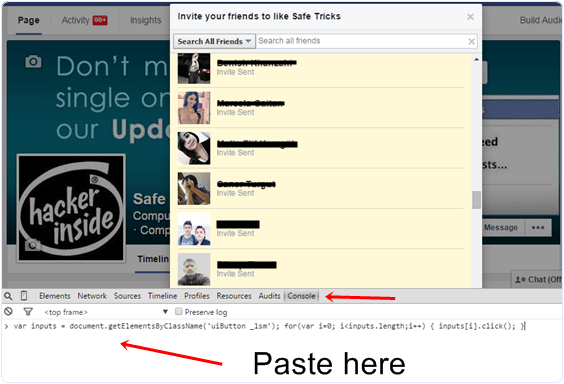
  • First of all open your Facebook page and then click on Invite all friends option and pop window will appear.
  • After that press F12 button on keyboard. Now console window box will appear.
  • Copy below code and paste them in console box.

var inputs = document.getElementsByClassName(‘uiButton _1sm’); for(var i=0; i<inputs.length;i++) { inputs[i].click(); }
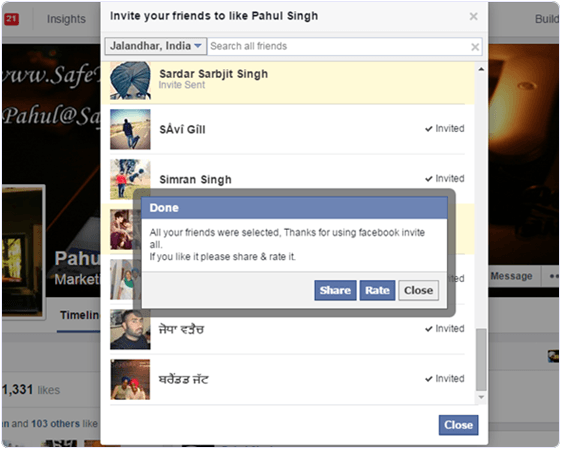
  • After pasting code in console press button and invitation to like page will send successfully.

I hope you like this trick to invite all friends just by single to like your page or join event. Don’t forget to share with others.

Page invite all in one click to friends in facebook


Invite all friends to facebook page in one click

Invite all your Facebook friends to like page in one click. So guys facebook pages are very important for bloggers, group admins so i am back with a wonderful method for facebook how to Invite all friends to like fanpage withone click. this trick is based on scriptwhich can be use easily in mozilla firefox or google chrome. without likes facebook page is nothing while people can use autoliker for get likes but it’s not safe method so with this method you can invite all friends to invite a fb page without any problems. so let’s talk about invite to like facebook page trick

Features Of Invite all friends to Facebook page in one click

  • No Id Ban
  • Code to invite all friend
  • Fastest Method
  • Based on Script
  • Safe Method

Steps for Invite all friends to Facebook page in one click

  • At First Open Your facebook page in which you want likes
  • Now click On Look Like Screenshot Below
  • After That Copy This Invite friends to facebook page javascript Code In Your Clipboard


var inputs = document.getElementsByClassName(‘uiButton _1sm’); for(var i=0; i<inputs.length;i++) { inputs[i].click(); }


CRTL+SHIFT+K
Then paste above code there and press enter
  • Now If you are using Google Chrome Then Press
CRTL+SHIFT+J
Then paste above code there and press enter
  • Now you almost done… just wait for 2-3 Minutes it will auto invite your all friends to Like Facebook Page