Showing posts with label Mobile Tips. Show all posts

Monday, 16 March 2015

How To Transfer Data From Android To PC Using WIFI

How To Transfer Data From Android To PC Using WIFI

Many times we need to Transfer Data from our Phone to PC/Laptop or vice verse because of to save our personal photos, audios, videos and other files in PC/Laptop or mobile phone. In every day we often connect our phone to computer with the help of USB. But you cannot carry or have USB all the time with you but any situation or time when you have to need to transfers data from computer/laptop to your phone  or vice verse in college or any other place then it becomes difficult for it. But don't worry there is always a solution of every problem so that for this problem a Software Data Cable app is designed for android users to transfers the data from mobile phone to computer or computer to mobile phone without any use of data cable. This app is free of cost and you can download it from Google play store. With the help of this app it becomes easy, fast and secure way to to transfers data. This app can Connect and share everything among phones, Pad, Google TV, Cloud storage, Xbox, PC, Mac, Laptop etc. So here is a simple steps to download and transfers data from android phone to PC/Laptop or vice verse without using data cable.


-------------------------------------------------------------------------------------------
Steps To Transfers Data From Android Phone To PC
-------------------------------------------------------------------------------------------

#1. First of all you have to an same WiFi network connection on computer or your android phone.
#2. Then simply Download the Software Data Cable app from Google Play Store.


How To Transfer Data From Android To PC Using WIFI


#3. Install the app in your android phone and click on start service.

How To Transfer Data From Android To PC Using WIFI


#4. Then it will show you ftp://192.168.1.5:8888 address, simply copy the address or fill into your computer address bar and click OK. It will show you storage folder where your all files stored now  you can transfers the data from your android phone to computer or vice verse.

How To Transfer Data From Android To PC Using WIFI


I hope you like this method and find easy to use. In case you have any question please leave your comments below.

Monday, 2 February 2015

Pakistan Phone Numbers App – Very Important & Informative

Pakistan Phone Numbers App – Very Important & Informative

In the recent past it was very common to find a big fat telephone directory in many homes which contained all the listed telephone numbers that were present. It was a very handy tool in many homes and could be used to find any sort of number.  However with its huge size, the telephone directory lost its appeal and a convenient alternative was not present in today’s mobile world.


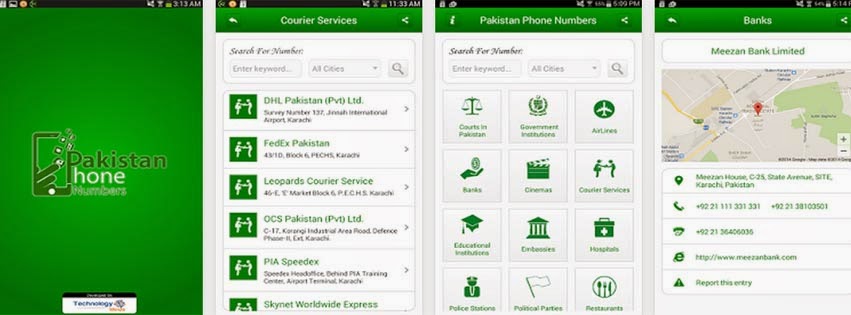
Pakistan Phone Numbers App

This need has now been addressed by the Pakistan Phone Numbers App which is a very effective and easy to use tool for finding thousands of important numbers which are required in the daily lives of people. The application has been developed by Business Teria Communication. It runs on Android 2.3 and above and is gaining popularity among the local population.


-------------------------------------------------------------
-------------------------------------------------------------


The Pakistan Phone Numbers App is clear and easy to use. The numbers are divided according to several categories. These categories include hospitals, restaurants, embassies, educational institutions, banks and police stations. The app contains thousands of such numbers and offers the option to search for contact information based on keywords and according to the city required.

The contact information is regularly updated to add more numbers and if the information is outdated or wrong, it can be reported and the developers will correct it. The Pakistan Phone Numbers App is a very convenient and informative application and is a must have for all Pakistani Smartphone users.

Friday, 26 December 2014

Check Your Mobile is Genuine or Fake


Mobile Markets are full with Fake Phones and mobiles are being sold as original even with Branded tags next to it the replica phones are kept in the market that looks similar to the original phone, to make sure whether your phone is original or fake there would be two ways of checking it. These methods will help you during purchasing a used cell phone.


Check the following Features:

Be alert about the spellings for example Soniericsson, Nokia and Samsung

Warranties: Always ask for 12 months warranty certificate from the phone manufacturers; never trust on an oral agreement with the seller. Fake phones come with a short warranty periods as counterfeiters cannot give guarantee it will last so long.


Check handset in all aspects completely: Some people take phones home without testing it first. Some dealers make you fool and encourage this, knowing the handset is fake. As you check it out, you might observe some points of low performance or other issues such as memory which is cheap quality photos.


Appearances: like dull colours, screen size, quality of printing and paint finish, Fake built quality difference in weight, logos, location of buttons and battery, missing functions, quality control and holograms and lack of quality.


The other method is examining or checking Phones quality through 15 digit IMEI code


Dial *#06#


Dial *#06#


IMEI stands for ( International Mobile Equipment Identity). This is a 15-digit number and might be found in the packet of the mobile phone as well. It might be found by eliminating the back cover and it might be located on the battery.


The IMEI number may be as below:


IMEI CODE

3 6 9 3 9 5 0 1 2 3 5 5 6 7 8 


Now view the 7th and 8th digit. These two digits will make sure your phone’s quality!


  • If the seventh and eighth digits are 00 this shows your cell phone is made in Original Factory which makes sure the best quality.


  • If the seventh and eighth digits are 01 or 10 this shows your cell phone is made in Finland which is best quality.


  • If the seventh and eighth digits are 13 this shows your cell phone is gathered in Azerbaijan which is too bad. And it is also unsafe and dangerous for health!


  • If the seventh and eighth digits are 02 or 20 this shows your cell phone is gathered in Emirates which is very cheap quality. If the seventh and eighth digits are either 03/30 04/40, this shows your phone is manufactured in China but its good quality. But is bad either as 00, 01 or 10.


  • If the seventh and eighth digits are 05 or 50 this shows your cell phone is made either in Brazil or USA or Finland.


  • If the seventh and eighth digits are 06 or 60 this shows your cell phone is made either in Hong Kong, or China or Mexico


  • If the seventh and eighth digits are 08 or 80 this shows your cell phone is made in Germany which is good and fair quality.


  • This will help and facilitate you to select the good one but these tips might not work with the Sony Erickson Mobile Phone.