Showing posts with label Social Media. Show all posts

Thursday, 26 March 2015

Stylish Text Generator for Facebook

This is the Stylish Font Generator. This tool converts text you type into the stylish font which can be posted to Google+, Facebook, Twitter or anywhere else, even on desktop instant messengers like MSN Messenger, Yahoo messenger or Skype. Instructions for using the generator are below the font list but  it shouldn't be too complicated. We will be adding more fonts over time. Please tell all your friends about Font General!


Enjoy our great collection of cool fonts and make your plain old text something dazzling! Our amazing font generator converts your plain font into one of our extraordinary fonts. If you want to generate text that is stylish and cool, scroll through our collection of font choices and choose one that suits your mood! You can choose a new font to have fun posting messages and comments with every day! These fonts will display too on other websites than Facebook.
As you can see from the different font choices, we’ve included a terrific array of choices. Send a [̲̅b̲̅][̲̅o̲̅][̲̅x̲̅][̲̅e̲̅][̲̅d̲̅] text, a ♥l♥o♥v♥e ♥m♥e♥s♥s♥a♥g♥e to your sweetheart or share an ndsıpǝ poʍu (upside down) message after you’ve had a dizzying day! Take your time to choose your perfect font and when you’re ready to write another message, come back to our font generator and choose another!

Sunday, 22 February 2015

How To Block App/Game Requests On Facebook

How To Block App/Game Requests On Facebook
As we all know that Facebook is one of the biggest social media network. Now its become our necessary in daily routine to use Facebook for chatting or sharing status or pics with friends and family. We also play games on Facebook. But more than social site, Facebook becomes a marketplace for advertisers and companies. So they try to make its products popular through Facebook. It become easy to grow any business app on Facebook to make popular their brand or product name. Just like all the gaming companies have introduce games for different platform like android and iOS, but almost all of them also introduce their games on Facebook. Just because it will be easy for every to play game along with Facebook. 
Beside all these most irritating thing which every Facebook user face is games or other app requests on send by their friends or automatically from app. Just like many different apps like calculate love percentage, who visit your profile and games like candy crush, teen Patti and many more. Normally every games provide few extra points or features for sending invitation to Facebook friends. As this is best marketing strategy for them to increase popularity. For gaming lovers this may be not an issue but for normal person who don't want to play game on Facebook then it is better to get rid from all these notification of games and for those who love to play games on Facebook i want to recommend to play these below best Facebook games.

-------------------------------------------------------------------------------------------
Steps To Block App Or Game Requests On Facebook
-------------------------------------------------------------------------------------------

There are two different ways to block particular game request on Facebook. I will explain both of them to you. Follow any of the method which like or find easy to do. 


Method 1st:-

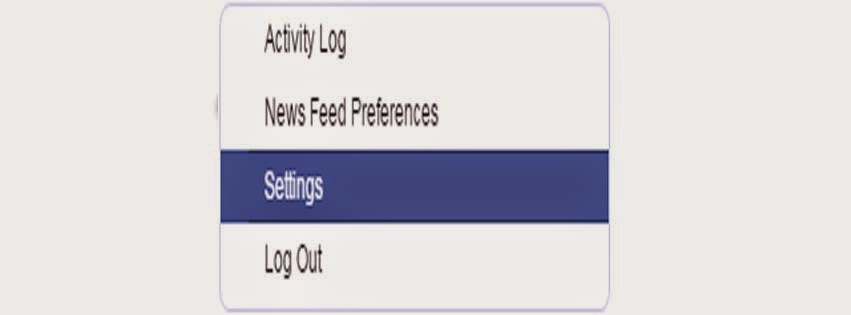
  • First of click on the top right side settings icon in your profile.
  • Then click on the settings option.

How To Block App/Game Requests On Facebook

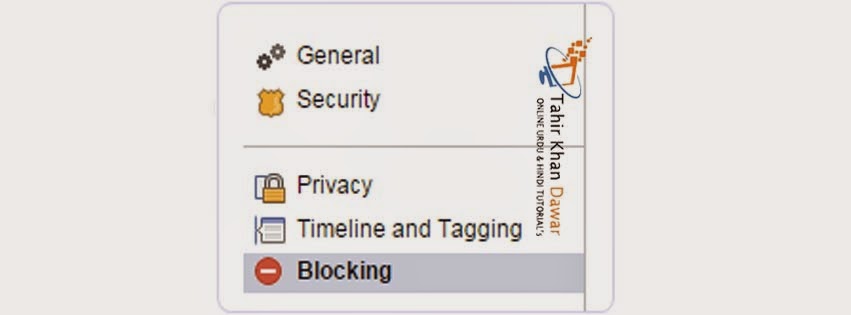
  • After that click on the option of blocking available on the left side panel of settings page.

How To Block App/Game Requests On Facebook


  • In Blocking Page there are many options available which are required to block different functionality.


Two blocking option which required are


#1 Block App invite

If is useful if you want to block any particular friend. Once you block that person then you will not receive further invitation of request and apps from that person. So if you want to block multiple person who send invitation then you need to add his or her name in the block user box.


How To Block App/Game Requests On Facebook


#2 Block Apps

In case multiple friends are sending you same game or app request then there is an option for block app. Simply type the name of that app in the block app box and you have done.

How To Block App/Game Requests On Facebook


Method 2nd:- 

If case you don't want to follow explained method or you want to try another way which may be find easy as compare to above. 

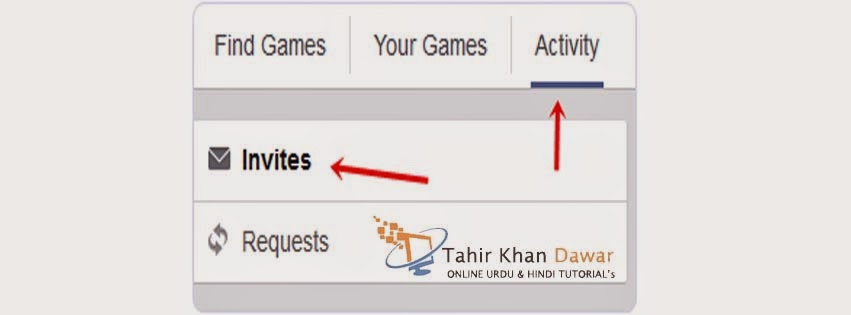
  • First of open Games App center.
  • Then click on the activity option available on the top menu.
How To Block App/Game Requests On Facebook


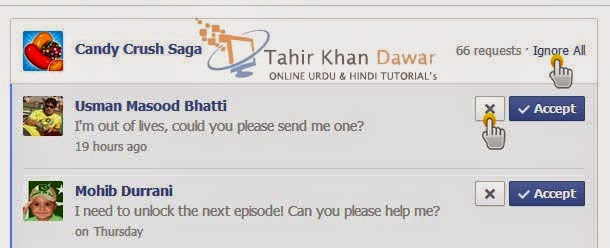
  • Now you will be able to see all the pending invites from your friends.
  • Simply click on the Cross "X" or Ignore All button appear on the app request.
How To Block App/Game Requests On Facebook


  • Click to block app or game request and confirm it.

So above explained are the two different ways to block any app request or game request easily on Facebook without any extension or script. Follow any of the above given method you like most and find easy. In case you face any kind or issue, don't feel any kind of hesitation to leave your comments.


.


Monday, 5 January 2015

How to Not see Friends Posts on Facebook - 2015

How to Not see Friends Posts on Facebook

کیا آپ فیس بک پر کسی دوست کی پوسٹس سے تنگ ہیں؟ ، جانئیے ایک آسان طریقہ جسکی مدد سے آپ اس شخص کے دوست رہتے ہوئے اسکی تمام پوسٹس سے نجات حاصل کر سکتے ہیں

فیس بک میں اکثر آپ اپنے دوستوں کی کچھ ایسی پوسٹس سے تنگ آجاتے ہیں جو آپ کے مطلب کی نہیں ہوتیں، آپ اس دوست کی پوسٹس سے تو تنگ آجاتے ہیں لیکن اسے اپنے دوستوں کی فہرست سے نکالنا نہیں چاہتے


ایسی صورتحال کا آسان علاج آج ہم آپ کو بتاتے ہیں


ایسا دوست جسکی پوسٹ آپ اپنی فیس بک کی نیوز فیڈ میں نہیں دیکھنا چاہتے اسکے پروفائل پر کلک کیجئے


اسکے بعد نیچے تصویر میں دئیے گئے Following کے بٹن پر کلک کیجئے۔

Click on Follow


کلک کرنے کے بعد یہ بٹن Follow میں تبدیل ہو جائے گا

Facebook Follow


اسکے بعد آپ اس دوست کی طرف سے کی گئی کسی بھی پوسٹ کو اپنی نیوز فیڈ میں نہیں دیکھ سکیں گے۔ لیکن آپ اس مذکورہ شخص کے دوست رہیں گے۔

جب بھی آپ دوبارہ اس دوست کی اپ ڈیٹس اپنی نیوز فیڈ پر دیکھنا چاہیں دوبارہ Follow کے بٹن کو دبائیں، یہ Following میں تبدیل ہو جائے گا اور آپ اس دوست کی اپ ڈیٹس دیکھ سکیں گے۔

Saturday, 25 October 2014

How to Quickly Unlike Multiple Facebook Pages


How To Invite All Friends On Facebook Page


How To Select All Friends in facebook in The Invitation Box??? Inviting Friends is a Major Part of Facebook Life. We Usually Invites Our Maximum Facebook Friends To Like Our Fan Page or To Participate in an Even. Facebook Dose Not Provide Any Direct Option To Select All our Freinds To Invitation Recipients, So We Have to Select One by One Bt Tick Marking on Each on Each of Them. Thus It's Difficult Task to Invite All our Friends.Friends So Follow This Video and Easly You are Invite Your all Fb Friends in FB page.


Thursday, 3 July 2014

How To Publish Empty Status And Comments on Facebook


Asalam o Alaikum Everyone!!! Today We Will Discuss on publishing Empty Status/Comments on Facebook. You Must have seen Your's Friends Who knows this Trick Publishing empty Status & Comments on Facebook, But when ask them How they do it??? They Won't Answer You.

Now its Time to show Your Friends that even you know the Trick to Publish empty Comments & Statuses.


How to Publish Empty Status on Facebook???


Step 01 => Login to your Facebook Account.

Step 02 => Copy this Code @[0:0:] & paste it in Status Box and Click on Post.

OR

Click on Status Box, Press and Hold "Alt" & Press 0173 leave Alt key and Click on Post see the magic.


How to Publish Empty Comment on Facebook????


Step 01 => Login to your Facebook Account.

Step 02 => Goto any post where you want to Publish you Empty Status.

Step 03 => Click on Add a Comment, Now Press and Hold "Alt" key and Press "0173" and press enter.


That's it, It's as Simple as that..

How do I allow ratings and reviews on my Page?

Facebook tips and trick 2015

Facebook tips and Track full Urdu and Hindi Tutorial's

To Let People add Star ratings and reviews to your Page, You will Need to Choose Local Business for Your Page's Category and add your Business address to the Facebook Page. You Can Choose Your Page's Category when You Create a Page, or if You have Already Created a Page, You can Change Your Page's Category.

To Change your Page's Category to Local Business:


How do I allow ratings and reviews on my Page? Tahir Khan Dawar

1. Click Setting at the top of your Page.

2. Click Page Info in the Left Column.

3. Click Category

4. Select Local Businesses from the first dropdown menu, then select a more spcific category (ex: Restaurant/Cafe) from the second dropdown menu

5. Click Save Changes


To add your Business Address to Your Page:

1. Click Setting at the top of your Page.

2. Click Page Info in the Left Column.

3. Click Address and enter your Business Address.

4. Click to check the Box Next to Show Map, Check-ins and Star rating on the Page.

5. Click Save Changes.

Monday, 23 June 2014

6 Facebook Security Tips Must Keep In Mind

How to Secure Facebook Account:

Best Facebook Tips
Facebook is a Huge Social Networking Site Which has Millions of Daily Users. Security & Privacy is the Main Thing for any Social Networking Sites Because We have Some Personal Information & Pictures which we only want to Share With our Family members and Friends, not any unknown Persons. So for the Security or Privacy, Facebook has Stepped up New Features in their Site for their Users. You are also the protector of your own Information within Facebook, So You have to Play your Roles as well. There are Simple things you should. As I Already Post about making Your Account secure and Increasing Protection. If You want to Know how much your account is secure then must follow below given two given Topics.

Must Read: How To Make Secure Your Facebook Account
Must Read: How To Increase Protection of Your Facebook Account


Here are a Few things you can do to keep your Account Safe:


1. Use a Strong Password:- You have to Make a Strong Password and which is not use for any other account. For other accounts use Different passwords. Use a different combination of numbers and letters and also use logical operators like (@, ! or &) etc. Learn How to Change Password.


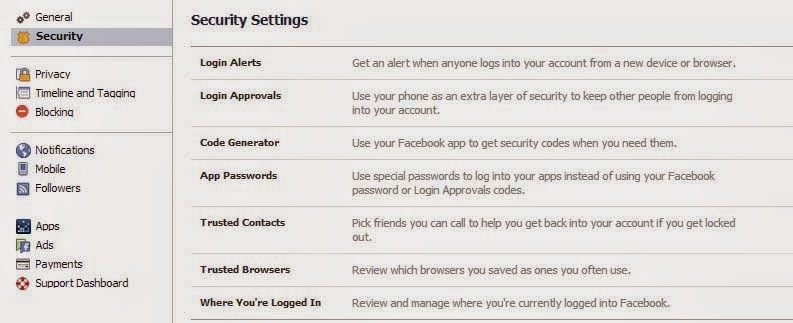
2. Activate All Security Settings:- Make secure your Email Accounts like gmail, Yahoo etc. If you don't know how to secure gmail account then must read our tutorial on Gmail Account Protection. If connected email is secure then your have to do some security settings in Facebook account settings. Go to Facebook Settings -> Then Switch To Security Settings. Always add at least 2 email address and mobile number. Try to use and activate all given security settings available in security section like secure browsing, Log in Notification, rusted Contacts and more.


3. About Section Settings:- All your personal information is in about section that what is your mobile number, where you live, where your family lives, your date of birth, your work place and everything you put in there. So keep your information secure from unknown persons and keep them only Friends or Only Me.


4. Privacy Settings:- From privacy setting you can manage who can see your stuff. Don't let unknown persons to see your stuff keep them only friends can see your posts. You can also manage who can look you up. If you allow anyone can look you up then any random or unknown persons can 
search you on Facebook. Keep only friends can look you up, so you can keep far yourself from other persons you don't know.


5. External Links And Apps:- Never click on any doubtful links which can send by your friends or any other company and want you to put your email and password. Also check URL before login into Facebook, Sometimes people make fake Facebook Log in pages. If you see any doubt in link then get change into www.Facebook.com. Always make sure that log in Facebook page URL must contain Facebook.com. If you URL or link is differ then leave that page. Never log in into any untrusted Facebook app. Never enter password in any application.


6. Update browser:- Update your browsers because latest version browsers become with new security protection facilities which will alert your from any harmful sites. FB mostly prefers Mozilla, Google Chrome, Safari, opera and Internet Explorer.


To become fully secured Little bit effort is necessary. So always examine everything to do before not only on Facebook also on other networks. So be safe be secure :)

How To Make Secure Your Facebook Account


1. Make sure only your Friends can see your Profile:


You wouldn't just go up to a stranger in the street and start telling them about your life, so why would you want them to see your Facebook profile?

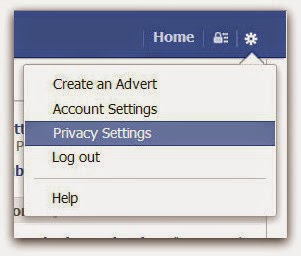
Click on the cog icon that you see in the top right hand corner of the screen. Then click Privacy Settings.


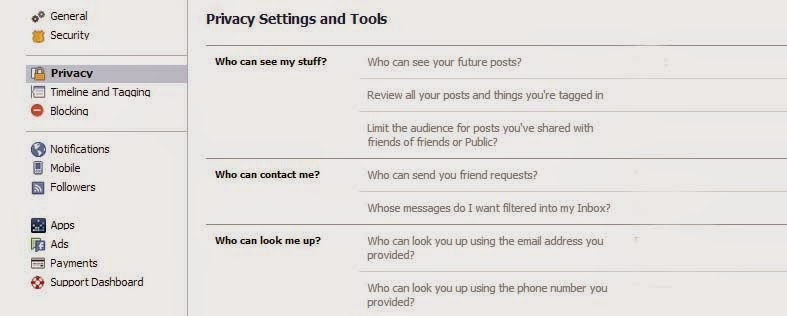
Click Privacy - the third option down in the left hand pane.


Click Privacy


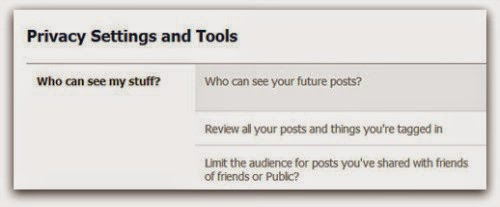
You are now in the Privacy Settings and Tools area of Facebook. From here you can control 'Who can see my stuff?

Privacy Settings and Tools


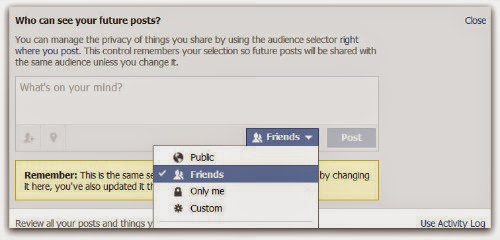
By editing 'Who can see your future posts?' you will be able to choose exactly who gets to see your future updates.

friends only


Choose from:
  • Public (which obviously means everyone)
  • Friends
  • Only you
  • Custom (which allows you to limit some of your friends from seeing your posts)

Pick what's best for you, but make sure 'Public' isn't selected. Whatever you choose will then become the default every time you post an update (though you still have the option of selectively changing this for each individual update you post in the future).

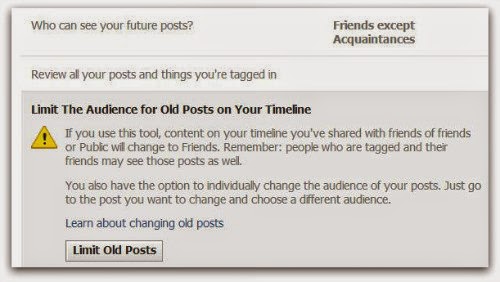
If you want to limit old posts that you may have made available to everyone or friends of friends then you can do this individually in the Activity Log, or you can choose to 'Limit the audience for old posts on your timeline'. This will change everything you've ever posted to only be seen by your friends...


Limit past posts


2. Control who can contact you on Facebook:


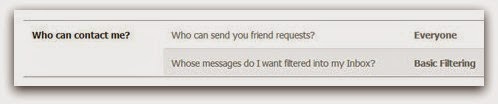
The second part of the Privacy Settings and Tools section allows you to select who can contact you.

who can contact me


By default this is set up to allow friends and people you may know the opportunity to send you a message to your inbox.


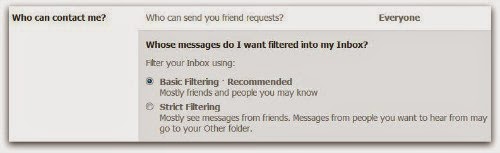
If you want only friends to be able to contact you, you can increase the filtering on your inbox. Other messages will then be diverted to your 'other' folder which you can access from your Messages screen.

Facebook contact


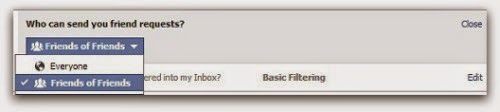
Additionally you can limit who can send you a friend request. By default, anyone can try to befriend you on Facebook, but if you'd rather limit that a bit you can change it so only friends of your friends can add you as a friend:

who can look me up


3. Limit who can discover your profile based on your email address and/or telephone Number:


The final option from the Privacy Settings and Tools screen allows you to control who can find you using your email address or telephone number.


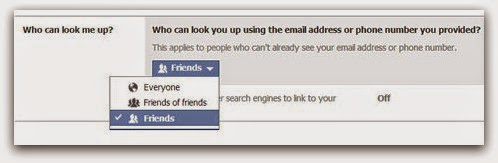
Under 'Who can look me up?', click Edit next to the line that says 'Who can look you up using the email address or telephone number you provided?'


who can look me up


Change the setting to 'Friends of friends' or 'Friends' only. 


4. Set up login Notifications:


Facebook can send you an alert every time someone accesses your account from an unknown computer or other device, enabling you to receive a warning that someone has gained unauthorised access to your account.


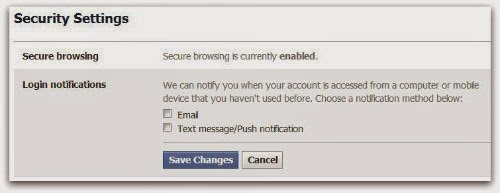
Still under Privacy Settings, click the second option in the left hand pane.


Facebook security


Click Edit next to login notifications and choose whether you want to receive an email or a text message/push alert. Click on Save Changes. Login notifications are now active.


Login notifications


5. Turn on login Approvals:


Every time you access your account from an unknown browser you can get Facebook to send a code to your phone which you will then need to use to login.


Next to 'Login approvals', click Edit. Then tick the box to 'require a security code to access my account from unknown browsers'. Click Save Changes


Facebook login approvals


Click Get Started. Facebook will then take you through the process of setting up login approvals.


Note, you'll only need to use a code whenever you login from somewhere new so if you always use the same browser and phone you will not need to verify your identity every time. It does makes it much more difficult for a hacker to get into your account from elsewhere, so it's a great thing to enable.

These are just a few tips that can help you safeguard your Facebook profile.

If you have any tips you wish to share, please leave them in the comments below.

How To Increase Protection of Facebook Account


How To Increase Protection Of Facebook Account


Facebook:


Facebook is a largest Social media, millions of people all around the world use Facebook to contact their friends, family or making some new friends. Due to this reasons, Facebook founder Mark Zuckerberg try to make security more tight day by day to make Facebook simple and easy to access.
But in a recent years many of Hackers and lots of Fake accounts makes Facebook out of control. Due To this reasons thousands of peoples lost their account daily because of lack knowledge about Securities of Facebook. But Facebook developers and Engineers doing Great Jobs and introducing new security feature day to day.


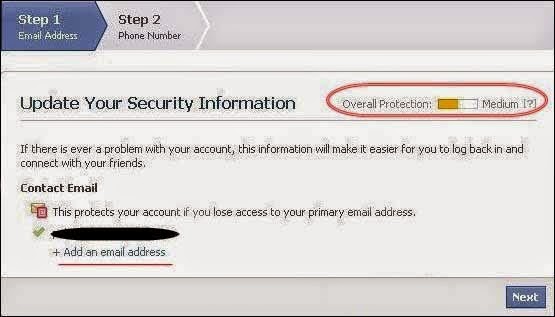
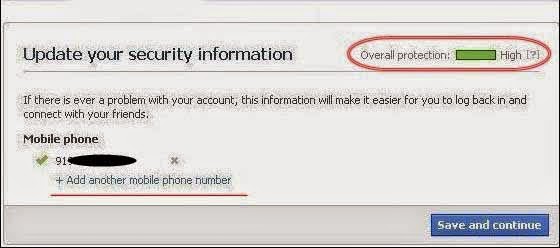
Now If You want Protect your account from these Spammers and want to increase your account security just follow my given these Steps.


  • After you Press on Click here button given above, New tab will appear.
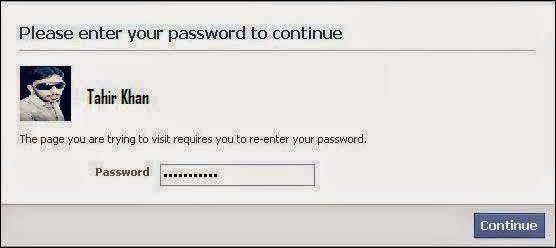
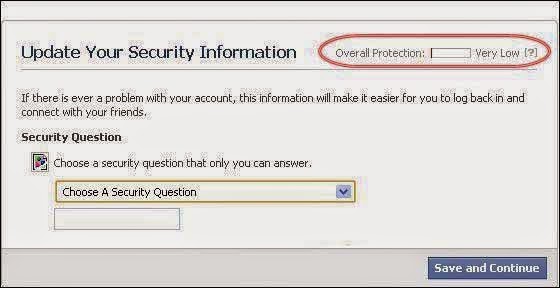
  • Then Enter your Password, after then See your Overall Protection. 
  • After Setup Your Security question 
  • Then add your minimum 2 email Address. 
  • Then Set your minimum 1 phone no.
  • After all these steps see your overall protection. Follow all the as shown below.


Saturday, 8 March 2014

How to Change Facebook Theme in Urdu and Hindi


This post would help the visitor if they searching about "How to change facebook theme and style" if you want to change different look on Facebook. Every people knows that facebook is the No. 1 social networking site and daily more and more people are joint to this network. At that time many people are using there facebook account through phones / mobiles, smartphones and even from tablets so if you are not happy with Facebook current theme and want to see something unique color and text then this post surely help you. if you are not happy with facebook by default look then now you can change its look, themes, change background, text style easily on Mozilla Firefox add-ones and google chrome extension.


Conclusion :


Facebook is a very nice platform where people are engage each other and sharing their experience, website post, new services, updates. So many people are working day by day in this site and their eyes not happy to see Facebook by default theme. I hope this tutorial post surely help them to change their facebook style and theme.

Tuesday, 22 October 2013

How to hack facebook account Urdu and Hindi


Daily countless numbers of Facebook accounts are hacked. Ever asked yourself how this really is achievable? Its since of the main loop hole in their security system. Facebook is recognized as todays normally used social network web site on the globe has its own security flaws which makes it possible for hackers to easily hack Facebook account. Anyone can easily hack account today cost-free by using this specific online hacking application. Basically no download and install required, simply input victm's profile URL address and click on start hacking. We are the majority internet site for obtaining facebook passwords and accomplish hundreds and hundreds of requests every day along with a 98 % effectiveness.


فیس بک پر اکاؤنٹ کیسے ہیک ہوتا ہے
ویڈیو دیکھیں