Monday, 7 July 2014

How To Make Unlimited Folder Using Notepad

HOW TO MAKE UNLIMITED FOLDER USING NOTEPAD

الســــلام علیــــکم ورحمۃ اللہ وبرکاتہ
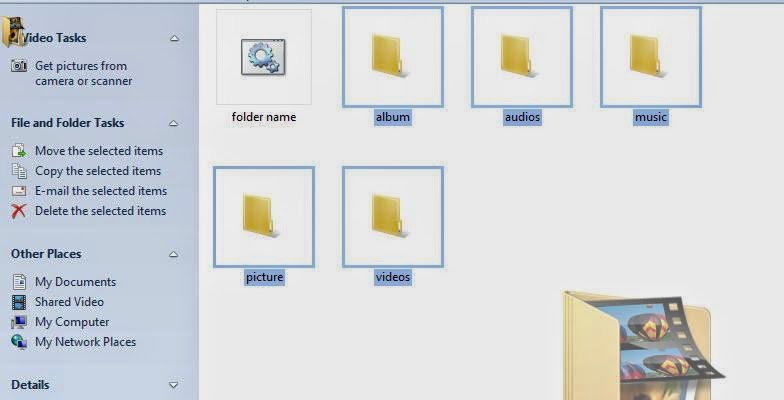
دوستوں آج میں آپ لوگوں کیلئے لایا ہوں ۔ ایک ایسی ٹپ جس سے آپ اپنی مرضی کے ناموں کے ساتھ بناسکتے ہیں ، بیشمار فولڈر وہ بھی صرف ایک کلک پر اور فولڈر کو دوبارہ نام دینے کی ضرورت بھی نہیں توسب سے پہلے نوٹ پیڈ کھولئے اور اس میں لکھے انگلش لیٹرز میں (ایم) ( ڈی) ۔ اور اسکے بعد پھر جس جس نام کا فولڈر بنانا ہے ۔ وہ لکھے لیکن ان ناموں کے بیچ میں سپیس ہونی چاہیئے ۔ پھر اس کے بعد کوئ بھی نام دیکر ڈاٹ دے ۔ اور اسکے بعد بیٹ(یعنی (بی) (اے) (ٹی) لکھے اور اسکو مائی ڈاکومینٹس میں سیو کرے ۔ اور پھر اسکے بعد اس کو رن کرو تو جتنے نام آپ نے لکھے ہونگے اتنے فولڈرز بن جائنگے ۔
مثلا اس طرح لکھے ۔۔۔۔۔۔۔۔۔۔۔۔۔۔۔۔۔۔۔

md videos audios music album picture
اسکے بعد اسے نام دو

folder name.bat
اسکے بعد اسے سیو کرو

save on my documents
اسکے جو فائل بنے گی اسکو رن کرو تو جتنے نام لکھے ہونگے اتنے فولڈرز بن جائینگے.


Friday, 4 July 2014

How to Write Urdu in Adobe Photoshop CS6

How to Write Urdu in Adobe Photoshop CS6

الســــــلام علیــــــکم ورحمۃ اللہ وبرکاتہ

میــــں کافـــی دنـــوں ســے دیکــھ رہــا ہـــوں اکثــر ممبـــرز خــاص طــور پــر وہ جــو اڈوب فــوٹــو شــاپ کــے نئــے یــوزر ہیــں
آئــے روز تھـــریــڈ بنــائے رکھتــے ہیــں کہ اڈوب فــوٹــو شــاپ میــں اردو کیســے لکھیـــں
آج میــرا ماتھـــا ٹھنکــا میــں نــے آئــی ٹــی دنیــا پــر ســرچ کیــا مجھــے کوئــی تھــریــڈ نہیــں مــلا
مگـــرمجھـــےگوگـل پـــر ایک طــــریقــــہ مــل گیــا جــو کــہ آپ لــوگــوں کــے ساتــھ شئیـــر کــر رہــا ہــوں۔میــں چاہتــا ہــوں کہ اگـــر ہو سکـــے تـــو میــرا یــہ تھــــریڈ اِسٹکـــــــی کیـــا جائــــــــــے۔
تصــــاویـــــــــر فـالـــــو کیجیـــــــــے۔۔۔

Thursday, 3 July 2014

How To Publish Empty Status And Comments on Facebook


Asalam o Alaikum Everyone!!! Today We Will Discuss on publishing Empty Status/Comments on Facebook. You Must have seen Your's Friends Who knows this Trick Publishing empty Status & Comments on Facebook, But when ask them How they do it??? They Won't Answer You.


Now its Time to show Your Friends that even you know the Trick to Publish empty Comments & Statuses.


How to Publish Empty Status on Facebook???


Step 01 => Login to your Facebook Account.

Step 02 => Copy this Code @[0:0:] & paste it in Status Box and Click on Post.

OR

Click on Status Box, Press and Hold "Alt" & Press 0173 leave Alt key and Click on Post see the magic.


How to Publish Empty Comment on Facebook????


Step 01 => Login to your Facebook Account.

Step 02 => Goto any post where you want to Publish you Empty Status.

Step 03 => Click on Add a Comment, Now Press and Hold "Alt" key and Press "0173" and press enter.


That's it, It's as Simple as that..

How do I allow ratings and reviews on my Page?

Facebook tips and trick 2015

Facebook tips and Track full Urdu and Hindi Tutorial's

To Let People add Star ratings and reviews to your Page, You will Need to Choose Local Business for Your Page's Category and add your Business address to the Facebook Page. You Can Choose Your Page's Category when You Create a Page, or if You have Already Created a Page, You can Change Your Page's Category.

To Change your Page's Category to Local Business:


How do I allow ratings and reviews on my Page? Tahir Khan Dawar

1. Click Setting at the top of your Page.

2. Click Page Info in the Left Column.

3. Click Category

4. Select Local Businesses from the first dropdown menu, then select a more spcific category (ex: Restaurant/Cafe) from the second dropdown menu

5. Click Save Changes


To add your Business Address to Your Page:

1. Click Setting at the top of your Page.

2. Click Page Info in the Left Column.

3. Click Address and enter your Business Address.

4. Click to check the Box Next to Show Map, Check-ins and Star rating on the Page.

5. Click Save Changes.

Wednesday, 2 July 2014

How to Create Icons


Do You Want to Spruce up Your Desktop? Custom Icons Can Go a Long Way Towards Making Your Computer Feel Like "Yours". With The Help of Free Image Editing Software Like GIMP, You Can Quickly Turn Any Images You Want Into a Beautiful, Scalable Icon That You Can Use anywhere. Follow This Pictures.


50 Stylish Themes for Windows XP


Windows XP is a One of The Best & Most Usable Operating System Lainched By Microsoft on August 24, 2001. It is The Second Most Popular Version of Windows, Based on Installed User Base. Window Xp Specially Design 4 Personal Computers, Inculding Home & Business Desktops, Loptops, & Media Centers.
Collected 50 so Stylish With Great Design Will Satisfy You, This New Set of Beautiful Themes For XP Windows. All Topics are Set Independently (.exe Files) & Do Not Need To install Additional Programs Such as Style XP or Windows Blind, Which Eat Up a Lot of System Resources & Often Violate The Stability of The System.


♥Download♥

Thursday, 26 June 2014

How to Make an Invisible File

Create a new folder in your specified directory.


Customize the folder if you want to. Don't rename it just yet. Right Click the New Folder, go to Properties, then to Customize, and then click Change Icon.Here is the trick, go to the middle and you should see some blank spaces. Those are transparent icons, select one of those then press OK -> Apply -> OK.


Name your folder. Press rename and instead of the file press ALT+0160 (Remember to keep the ALT button pressed down while typing the numbers). ALT+0160 makes a space that is not the same as a normal space.


You should have finished your new invisible file, Congratulations.


For it to work on your laptop you need to keep Holding down the Alt key you will also need to hold the FN key and type the numbers "0160." These are over the letters m, j, o, m. Let go of all of the keys and hit enter. Holding the Alt and typing those numbers will name the folder as a space, pretty much giving it no name.


Note: Make sure the Num Lock on the laptop is selected.