Wednesday, 9 December 2015

How to Disable Right Click in Blogger Blog 2015-2016

{ *How To GuideDisable Right Click in Blogger Blog, Want to Disable Mouse Right Click Button on Blogger Blog } Tutorial about how to add Mouse Right Click Disable Script in Blogger Blog ( protect your copyright content from being used in any other website.)

Have you ever noticed? that in some websites or blogger blog do not allow their visitors to USE Mouse Right Click button,So that we can not copy anything from their blog.

In this post i will be sharing how you can also Disable Mouse Right Click Button on Blogger Blog, Here is the latest Java Script to protect your copyright content from being used in any other website.


How to Disable Right Click on Blogger Blog

Follow these steps to add Disable Right Click on Blogger Blog ( Java Script)

1) Log in to Blogger Dashboard --> Layout

2) Click on 'Add a Gadget' on the sidebar

3) Select 'HTML/Javascript' and add the code given below and click save.

---------------------------------------------------------------------------------------


<script language=JavaScript>
<!--
//Disable right mouse click JavaScript
//By HackerSpedia
var message="Function Disabled!";
///////////////////////////////////
function clickIE4(){
if (event.button==2){
alert(message);
return false;
}
}
function clickNS4(e){
if (document.layers||document.getElementById&&!document.all){
if (e.which==2||e.which==3){
alert(message);
return false;
}
}
}
if (document.layers){
document.captureEvents(Event.MOUSEDOWN);
document.onmousedown=clickNS4;
}
else if (document.all&&!document.getElementById){
document.onmousedown=clickIE4;
}
document.oncontextmenu=new Function("alert(message);return false")
// -->
</script>


After Saving Visit Your Blog When you will try to do Right Click, a message will tell you that "Function disabled" , and if you want to change this words” Function Disabled” Then simply find it in code and replace it. 

By Using this Script you can protect your Images and Copyrights Content from Being Use in Other Websites

Saturday, 5 December 2015

Extract YouTube Thumbnails From Blog Posts via JSON

Extract YouTube Thumbnails from Blog posts

Today's tutorial is first time shared online Alhamdulillah that will discuss the most advanced and unique technique of extracting thumbnails from a YouTube Video Iframe embedded inside your blog posts. Our technique is unique because it will ignore all images inside the post and will only pull out the Iframe Image provided by YouTube and will display it as the featured thumbnail. If no video Iframe was found only then the existing third party images inside the blog post will be considered to play a thumbnail role. We have already discussed the manual method of displaying YouTube thumbnails in blogspot posts and today we will discuss the dynamic method to automatically do the job for you. Although Blogger now provides a default link to YouTube thumbnail in its JSON feed API but due to its low resolution we still need a better dynamic method to do the job for us. Lets get to work!

Note: Click the Button below to see full list of topics under discussion.

Topics List

Location of Thumbnail URL

We will use the second method that we discussed in part#9 to extract an image from inside the post content using the path:

json.feed.entry[i].content.$t

Kindly go through part#9 to know the basic technical details

Display YouTube Featured Thumbnails in Recent Posts Widget

Now comes the coding part. We will use the exact same script that we have shared in part#10. Major modifications made have been highlighted in Purple with white text.

<!-- ######### Writing Callback Function ############# -->
<script type="text/javascript">
//----------------------------Defaults
var ListBlogLink = window.location.hostname;
var ListCount = 5;
var TitleCount = 70;
var ListLabel =" ";
var ChrCount = 80;

var ImageSize = 100;

//----------------------------Function Start
function mbtlist(json) {
document.write('<ul class="mbtlist">');
for (var i = 0; i < ListCount; i++)
{

//-----------------------------Variables Declared
var listing= ListUrl = ListTitle = ListConten = ListContent =ListImage =thumbUrl =sk = "";
//----------------------------- Title URL
for (var j = 0; j < json.feed.entry[i].link.length; j++) {
if (json.feed.entry[i].link[j].rel == 'alternate') {
break;
}
}
ListUrl= "'" + json.feed.entry[i].link[j].href + "'";
//----------------------------------- Title Stirng
if (json.feed.entry[i].title!= null)
{
ListTitle= json.feed.entry[i].title.$t.substr(0, TitleCount);
}

//----------------------------------- Content Check

ListConten = json.feed.entry[i].content.$t;
ListContent= ListConten.replace(/(<([^>]+)>)/ig,"").substr(0, ChrCount);

//------------------------------------ Thumbnail Check

// YouTube Thumbnail Search

if (json.feed.entry[i].content.$t.match(/youtube\.com.*(\?v=|\/embed\/)(.{11})/) != null)
{
var youtube_id = json.feed.entry[i].content.$t.match(/youtube\.com.*(\?v=|\/embed\/)(.{11})/).pop();
if (youtube_id.length == 11) {
        var ListImage = "'//img.youtube.com/vi/"+youtube_id+"/0.jpg'";
        }
}

// Blogger Default Thumbnail Search

else if (json.feed.entry[i].media$thumbnail)
{
thumbUrl = json.feed.entry[i].media$thumbnail.url;

sk= thumbUrl.replace("/s72-c/","/s"+ImageSize+"/");
ListImage= "'" + sk.replace("?imgmax=800","") + "'";
}

// Support For 3rd Party Images
else if (json.feed.entry[i].content.$t.match(/src=(.+?[\.jpg|\.gif|\.png]")/) != null)
{
ListImage json.feed.entry[i].content.$t.match(/src=(.+?[\.jpg|\.gif|\.png]")/)[1];
}

else
{
ListImage= "'https://blogger.googleusercontent.com/img/b/R29vZ2xl/AVvXsEhpXmaoEd8nf_mfrGK2SwDbtAkJ_XN0MqsELIme26v0X-VHhAPR_aDHLrKT9iPUjg2-vMGvnWKHZAtlUpgI8jM-5vdfxzSfKQ-Ag31ZIXks3FDJGcXbjzUBRYKUiyA7waGNDuE1NPeJX0c/s200/Icon.png'";
}


//----------------------------------- Printing List
var listing = "<li><a href="
+ ListUrl+
  "><img src="
+ListImage+
"/></a>
<a class='mbttitle' href="
+ListUrl+
"target='_blank'>"
+ListTitle+
"</a><span class='icontent'>"
+ListContent+
" ...  <a href="
+ListUrl+
" class='imore'>»</a></span>
</li>";
document.write(listing);
}
document.write("</ul>");
}
</script>
<!-- ######### Invoking the Callback Function ############# -->
<script>
ListBlogLink = "http://www.mybloggertricks.com";
ListCount = 4;
TitleCount = 70;
ListLabel = "Video";
ChrCount = 100;

document.write("<script src='"+ListBlogLink+"/feeds/posts/default/-/"+ListLabel+"?alt=json-in-script&callback=mbtlist'></"+"script>");
</script>
<!-- ######### Styles for Look ############# -->
<link href='http://fonts.googleapis.com/css?family=Oswald' rel='stylesheet' type='text/css'/>
<style>
.mbtlist {list-style-type:none;overflow:hidden}
.mbtlist li {margin:0px auto 20px auto; clear:both; color:#666; font-family:Helvetica; font-size:12px; border-bottom:1px dotted #ddd;padding-bottom:10px;}
.mbtlist .mbttitle {font-family:oswald; font-size:16px; color:#0080ff; font-weight:normal; text-decoration:none;}
.mbtlist .mbttitle:hover {color:#00A5FF;}
font-family:georgia; font-size:15px; font-weight:bold}
.mbtlist div span{margin:0 10px 0 0; display:inline-block;}
.mbtlist span {display:block; margin:5px 0px 0px; padding-right:5px;}
.mbtlist .imore {font-size:16px; font-weight:bold; text-decoration:none; color:#666; line-height: 0.7em;}

.mbtlist img {float:left; margin:0px 10px 10px 0px; border:6px solid #fff; padding:0px; width:100px; height:65px; box-shadow:-1px -1px 4px #777; }
.mbtlist .icontent {text-align:justify;}

</style>

OUTPUT:

YouTube Featured Thumbnails in blog list 
Note:

If you visit our Label Video, you will notice that the posts also contain images and our blog is displaying those images as thumbnails and not displaying the youTube thumbnail. But with the above advanced widget, you will actually display youTube thumbnails. I will update the Summary plugin that our blog is using shortly.

How it works?

  • First we ran a loop to check if a YouTube Iframe actually exists.
  • Next we stored the 11 Characters Video ID inside the variable youtube_id using the .pop() method.  .pop() method returns the last group match of the regular expression i.e. {11} - the video ID
  • Finally we inserted the Video ID inside the standard URL structure of YouTube Thumbnails. We stored the Image URL inside ListImage and passed this value for printing.
  • That's it!

How to use it?

To use this plugin for your blogs, simply copy paste the code inside a HTML/Javascript widget and replace ListBlogLink and ListLabel with your Blog URL and Label respectively. For more details read part#6.

Need Help?

Let me know if you ran through any problems in understanding the interesting concept shared above. I hope this method will take blogger to the next level and will help young developers to build better widgets for their blogspot blogs. Feel confident to ask any question by posting your comments. Your brother is here for any help needed. =)

Friday, 4 December 2015

What is Link Juice in SEO & How to Improve it?

Link juice has been one of the important SEO factors since the beginning of Search Engine Optimization. And it’s still important, if you don’t know about Link Juiceyet then this guide is for you. Link Juice is refereed to the number of external and internal links pointing back to your website and it’s inner pages. In this article, I’ll discuss how can we improve link juice of our websites to increase search engine visibility.
seo-link-juice


Practical Examples of Link Juice

As mentioned above, link juice is basically the number of internal & external links pointing to your website’s home page or any other page within your site. So in this scenario, if you have 100 links on the internet pointing back to your website’s home page or any other page then those 100 websites are passing some type of link juice to your site.
To make it more clear, if a website has a domain authority of 60 and page rank 4, and that website has a link which is pointing to your website then you’ll get some high level link juice from that website. Meanwhile, if you have a link on a site having 30 domain authority & page rank 2 then you’ll get a bit low link juice. However, in all cases, you’ll get link juice from sites which are relevant to your website. Because in link juice, you can also get negative points when you link your site to irrelevant or low quality websites.

How to Improve External Link Juice?

Link juice can be improved by many ways. First of all, find relevant websites which has similar content like yours, and try to create a link with them, that will give you more positive link juice, and try to find websites which are high quality & high authority. If that’s not possible for you then just go to popular social networks such as FB, Twitter, Stumbleupon, Pinterest & Google+ and share your content there, they can also pass some link juice to your content. You can also use relevant discussion forums for this purpose by sharing your content there.

How to Improve Internal Link Juice?

Now the easiest way to improve link juice is to work within your site, you can dramatically improve the link juice by interlinking pages of your website to one another. And if you do this wisely then you’ll get more link juice than your thoughts. For example, if you link a popular page to a normal page within your website then that normal page will get so much link juice from the popular one (This is because the popular page already has very good link capacity or page authority). And sometimes, you need to link a poor page (Poor means which is not popular) to the home page, because your home page has much better link juice than any other page. So this is a door to door connection between pages on your website.
The last thing is that, you should make sure to create outbound or external links for your single pages as well, because most of the time people make a mistake by creating all the links pointing to the home page of their website which is not a great linking strategy. You should create at least 2 links for your single articles/pages on other places which can pass some link juice to your pages/articles, that will help you ranking in Google.
If you have any questions then please let me know via comment section below, I’ll be here to answer your specific questions regarding this post or any other matter related to this blog.

List of High Paying Adsense Keywords & Topics 2015-2016

This is a quick post to let you know about the Highest Paying Keywords & Topics for Google Adsense in 2015, You know Google Adsense is a PPC ad network which you can use to make money from your online content. Thousands of publishers use Adsense to generate lucrative income from their websites/blogs. We already have discussed about Applying for Adsense Account in Urdu as well as Keeping Your Adsense Account in Good Standing, but today, I’ll specifically talk about increasing your income with Adsense by using high paying topics & keywords within your websites/blogs and single articles. So please, carefully read the entire post till the ending sentence.
google-adsense-high-paying-keywords

How to Make More Money with Adsense?

There could be only four major reasons if you are not making very good money with Adsense, and the major reasons that we found are the following ones listed below:
  • Topic of the Website
  • Low Quality Content
  • Geographical Location of the Visitors
  • Placements of the Ads
If you have a very dead and “Gup Shup” topic for your website/blog then don’t dream for BIG money from Adsense, and if you have low quality content then still there is no good money for you, low quality means = no keyword based in-depth articles. If you are receiving most of the traffic from countries like Pakistan, Bangladesh and India then still don’t think of big money, and the last reason is the placements of the ads. So You should be taking some care of these all in order to make more money with Google Adsense.
If you are blogging using the following topics then I hope You’ll not make good money with Adsense, because You’ll not get the most relevant and high paying ads from Adsense, here is the list of low paying niches/topics:
  • Wallpapers
  • Celebrities
  • Poetry/Jokes etc
  • Only Embedded Videos
  • Showbiz

High Paying Topics for Adsense in 2015

Now here is the list of the topics which can pay you the highest money from Adsense, these are the topics which you can take into account for creating new websites/blogs in order to reach the BIG dreams with Adsense, follow the top list:
  • Insurance
  • Business
  • eCommerce
  • Web Hosting & Domains
  • Coupons
  • Charity
  • Technology (Blogging, Programming, Graphics, SEO, Make Money etc)
  • Travel & Tourism
  • Student Loans
  • Laws & Lawyers
  • All topics related to traffic from USA, UK & Canada :)
The above are some high paying Adsense topics which you can use to have handsome income from Adsense, and I hope You’ll have some knowledge over any of the mentioned topics above. And the last point in above list is getting traffic from USA, UK and Canada which is very incredible, Yesterday, I visited my Adsense account, and I found 31 clicks on Google Ads in last week, and those 31 clicks made $60 dollars, means almost $2 per click. And at the same time, I received 377 clicks from Pakistan which made me only $35, means almost .02 per click.
You can use Google Trends to find which topic is more popular in which country, and then You can use Google Keyword Planner tool to find which keyword is highest paying, all is possible with Google’s free tools.


High Paying Adsense Keywords in 2015

After I told You about the high paying topics, now it’s time to show exactly the keywords for 2015 which can make you huge money if you use theme, below is the list of keywords with highest paying CPC, so if you can work over them then you are the KING :)
  1. Mesothelioma Law Firm ($ 179.01)
  2. Donate Car To Charity California ($130.25)
  3. Donate Car For Tax Credit ($126.65)
  4. Donate Cars In Ma ($125.58)
  5. Donate Your Car Sacramento ($118.20)
  6. How To Donate A Car In California ($111.21)
  7. Sell Annuity Payment ($107.46)
  8. Donate Your Car For Kids ($106.01)
  9. Asbestos Lawyers ($105.84)
  10. Car Insurance Quotes Colorado ($100.93)
  11. Structured Annuity Settlement ($100.8)
  12. Annuity Settlement ($100.72)
  13. Nunavut Culture ($99.52)
  14. Dayton Freight Lines ($99.39)
  15. Harddrive Data Recovery Services ($98.59)
  16. Donate A Car In Maryland ($98.51)
  17. Motor Replacements ($98.43)
  18. Cheap Domain Registration Hosting ($98.39)
  19. Donating A Car In Maryland ($98.20)
  20. Donate Cars Illinois ($98.13)
  21. Criminal Defense Attorneys Florida ($98.07)
  22. Best Criminal Lawyer In Arizona ($97.93)
  23. Car Insurance Quotes Utah ($97.92)
  24. Life Insurance Co Lincoln ($97.07)
  25. Holland Michigan College ($95.74)
  26. Online Motor Insurance Quotes ($95.73)
  27. Online Colledges ($95.65)
  28. Paperport Promotional Code ($95.13)
  29. Onlineclasses ($95.06)
  30. World Trade Center Footage ($95.02)
  31. Massage School Dallas Texas ($94.90)
  32. Psychic For Free ($94.61)
  33. Donate Old Cars To Charity ($94.55)
  34. Low Credit Line Credit Cards ($94.49)
  35. Dallas Mesothelioma Attorneys ($94.33)
  36. Car Insurance Quotes Mn ($94.29)
  37. Donate Your Car For Money ($94.01)
  38. Cheap Auto Insurance In Va ($93.84)
  39. Met Auto ($93.70)
  40. Forensics Online Course ($93.51)
  41. Home Phone Internet Bundle ($93.32)
  42. Donating Used Cars To Charity ($93.17)
  43. Phd In Counseling Education ($92.99)
  44. Neuson ($92.89)
  45. Car Insurance Quotes Pa ($92.88)
  46. Royalty Free Images Stock ($92.76)
  47. Car Insurance In South Dakota ($92.72)
  48. Email Bulk Service ($92.55)
  49. Webex Costs ($92.38)
  50. Cheap Car Insurance For Ladies ($92.23)
  51. Cheap Car Insurance In Virginia ($92.03)
  52. Register Free Domains ($92.03)
  53. Better Conferencing Calls ($91.44)
  54. Futuristic Architecture ($91.44)
  55. Mortgage Adviser ($91.29)
  56. Car Donate ($88.26)
  57. Virtual Data Rooms ($83.18)
  58. Automobile Accident Attorney ($76.57)
  59. Auto Accident Attorney ($75.64)
  60. Car Accident Lawyers ($75.17)
Why are these keywords so expensive? the reason is; because advertisers have too much competition for these keywords, advertisers who want to use Google Adword (the front side of Adsense) they spend money (Too Much) on these keywords, and therefore when you get clicks, you get shocked to see the $$$ bucks for a single click from USA or any other top level country.
Let me know in the comments if you have any questions or you have any previous success with any of these keywords mentioned above, I mean which was the highest paying click on your Adsense based websites?

15 Best Ways To Find Out How Much Traffic a Website Gets

Traffic is main Part In Blogging.Every Blogger want to Get Million of Traffic.All Blogger Have Dream of Million Traffic in a days.Some Site Show Different Result and Page views.


Website Get Million of Traffic.People Earn a Lot of Money From Blog and websites.if we want to know about other website How Much Traffic a Website Gets.You want to know you Competition Website Traffic.

Find Out How Much Traffic a Website Gets

1 – Alexa

Alexa Mostly popular website.Alexa Internet, Inc. is a California-based company that provides commercial web traffic data and analytic.Alexa traffic rank to figure our the traffic to a website. You can directly check with Alexa.com or Install a Firefox or Chrome extension.Enter the website’s domain and Alexa will reveal the ranking of that website based on a combined measure of unique visitors and page views.Alexa.com tracks website visitor traffic rankings for many websites on the Internet.How Much Traffic a Website Gets

2 – Compete

Compete is also like Alexa and gives information about Unique Visitors, Compare Sites, Paid vs Organic Keywords, Visitor Demographics. Know about Traffic and other data sources to measure the traffic.How Much Traffic a Website Gets

3 – Similar Web

SimilarWeb.com another website like Alexa and Compete information.shows global and country rank.You get to know the site’s traffic over time, the countries that are sending the most traffic,also provide search keywords are bringing the organic and other things.How Much Traffic a Website Gets

4 – SEMRush

SEMRush.com is very famous tools in SEO.Semrush information around search (organic) traffic for any website. Put in the website URL and you’ll instantly know how the site has fared in organic search over time.also provide Country and Source of Traffic.How Much Traffic a Website Gets

5 – Traffic Estimate

TrafficEstimate It provides information in many areas, such as page-views, unique visits, keyword stats.Traffic Estimate is Also Provide Detail of Traffic.How Much Traffic a Website Gets

6 – Quant Cast

QuantCast.com Like Compete, you can use QuantCast to determine how many people have visited website during a give period from desktop or mobile phone. Show Result about including visitor demographics, traffic by country, and the split in mobile and desktop traffic.

7 – Website Informer

Website Informer is Also a tool of Traffic Measure Website.We Can track our visitor.  traffic by country, and the split in mobile and desktop traffic.How Much Traffic a Website Gets

8 – Google Ad Planner

Google Ad Planner is very Helpful and Free Tool of Google.We Find keyword and Also Find check Website Traffic.it is very simple and easy.

9 – Piwik Analytics

Piwik Analytics Piwik is a free,analytics platform for monitoring traffic to your own website.

10 – Website Traffic Metrics Tool

Website traffic metrics tool free resource gives you a bunch of data in one place,find out some basic Alexa rankings, keyword phrases the website is targeting,other websites targeting similar keyword phrases and websites with close relationships.

11 – URL Trends

URL Trends we can also see stat of Traffic with URL Trends.web site traffic tracking that they provide is good.you can download your report in a PDF format.

12 – Netcraft

Netcraft A little known corner of Netcraft is also dedicated to keeping track of popular domains.Netcraft only tracks the top 100 sites in each country. Unless your competitor happens to be Google, the BBC or eBay.

13 – Stats Crop

Statscrop If you’re interested in monitoring traffic to your own website.

14 – Woo pra

Woopra If your blog or website is powered by the WordPress platform.Woopra is a paid service offering customizable analytics for the purposes of discovering how much traffic goes to your own website and understanding your website’s customer base

15 – Google Analytics

Google Analytics is Google Products.we can see Traffic and Traffic source of website it is very popular product of Google.

Wolframalpha

wolframalpha is Same Software like other.we can also See Website Traffic.
if You Face any problem in this post and Any question related to Post Freely Contact us.Give your Feed back.Thank you.

Thursday, 3 December 2015

How to hack the facebook (2015-2016)

Hello friends today in this post i am showing you how to hack the facebook account 

I know this is not possible to hack the facebook account . 

but if you use this method for hack the facebook account you will dafinatly hacked the account ..


Tags:- facebook account hack,facebook account hacked, facebook account hacking, facebook account hacks ,facebook accounts hacked,facebook hac,facebook hack account,facebook hack password 2015,facebook hacked account,hacked facebook account,hacked facebook accounts,hacker account,hacker password,hacker programs,hacking a facebook account,hacking anonymous,hacking facebook account,help me hack a facebook account, hot to hack a facebook account,how do i hack a facebook account,,how to hack for free,how to hack in,how to hack in facebook accounts,how to hack the world,how to hacking,how to hacking, i need to hack a facebook account,i want to hack a facebook account,introduction to ethical hacking,is it possible to hack a facebook account,password crack software,pay to hack a facebook account, pay to hack facebook account,professional hacking,professional hacking,


How to hack the facebook....?

1:- Goto this site www.makbara.net orwww.free4sites.com and create account ..

2:- After create account goto loging and 


Click on any link and send the victim  :-


now after send this link to victim check the victim use this link or not
Click on {my victim}


CHECK FULL TUTORIAL :-


Blogger Now Supports Creating Featured Thumbnails for YouTube Videos

YouTube Thumbnails Support in Blogger BlogsWhile developing a JSON based Plugin for blogger blogs, we observed that Blogger now creates a featured thumbnail image automatically for YouTube videos embedded inside blog posts. This means now you don't need to extract YouTube Thumbnails using an advanced JavaScript method. This is done dynamically by Blogger through its JSON Feed API. In this tutorial I will demonstrate in brief how this thumbnail is created and stored inside a json object. If you are a developer, you may find this discovery extremely interesting because it helps to shorten your code and optimize it for better performance as no search for YouTube thumbnail is required now on your behalf. So far the thumbnail support only exists for YouTube videos, I tested vimeo and dailymotion videos but the thumbnails were not created.
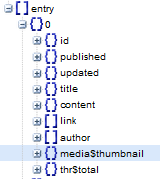
In our coming JSON series we will surely discuss the JavaScript technique that we previously used to develop widgets for clients because though blogger creates an auto thumbnail for YouTube Iframe but the disadvantage of this method is that the thumbnail is in square format having dimensions 72 x 72. Blogger is actually extracting the default small YouTube thumbnail which has dimensions 120 x 90 (pixels).Therefore if you wish to display large HQ thumbnails inside your apps then you may wait for our next tutorial.

If you are new to Blogspot JSON feeds, I would recommend that you at least read part1 and part2 of this tutorial series.

Note: Click the Button below to see full list of topics under discussion.

Topics List

The YouTube Thumbnail is stored inside media$thumbnail

Assuming you already have read how to view your JSON feed in a human readable format, I am sharing below the steps to locate where exactly the thumbnail is stored.

1. Embed a YouTube Iframe inside your blog and publish the post.

2. Copy your new JSON code. In our case we are using a test blog and the url for its JSON feed is:

http://www.facebook-comments-box.blogspot.com/feeds/posts/default?alt=json

3. Next Navigate to JSON > feed > entry

Select the most recent post which of course is inside the element { } 0

blogger json feed thumbnail

4. Expand the node media$thumbnail to see its elements.

media thumbnail node elements

From the image above you can observe that Blogger JSON feed provides 4 basic information about the thumbnails. The important among which is the url.

  • xmlns$media:  This tag provides the link for Media RSS specification directory which provides meta data info for video clips. Currently though it points to search.yahoo.com/mrss/ but it will soon be replaced with rssboard.org/media-rss in future. Full Details
  • url: This is the Image link to the default YouTube Thumbnail. Its default size 120 X 9.
  • height: default size for height
  • width: default size for width

The thumbnail that blogger creates ends with extension default.jpg. If you replace it with 0.jpg, you will get a much larger High Quality thumbnail. We will discuss how to do it in our coming tutorial.

http://img.youtube.com/vi/ht866-K1JeU/default.jpg  (120 x 90)

default youtube thumbnail

Replace with 0.png for large thumbnails

http://img.youtube.com/vi/ht866-K1JeU/0.jpg   (480 x 360 )

Large youtube thumbnail

Need Help?

For a more advanced approach I will share the JavaScript technique in next part of this tutorial series. Let me know if you have any queries with regard to the above tutorial. I have tested vimeo videos and also dailymotion videos by embedding them in blogspot posts but so far only YouTube thumbnails are supported in Blogger.